Monitor
Pages
Every page on your site with the citations it has earned across the answer engines, and the pages that have never been cited at all.
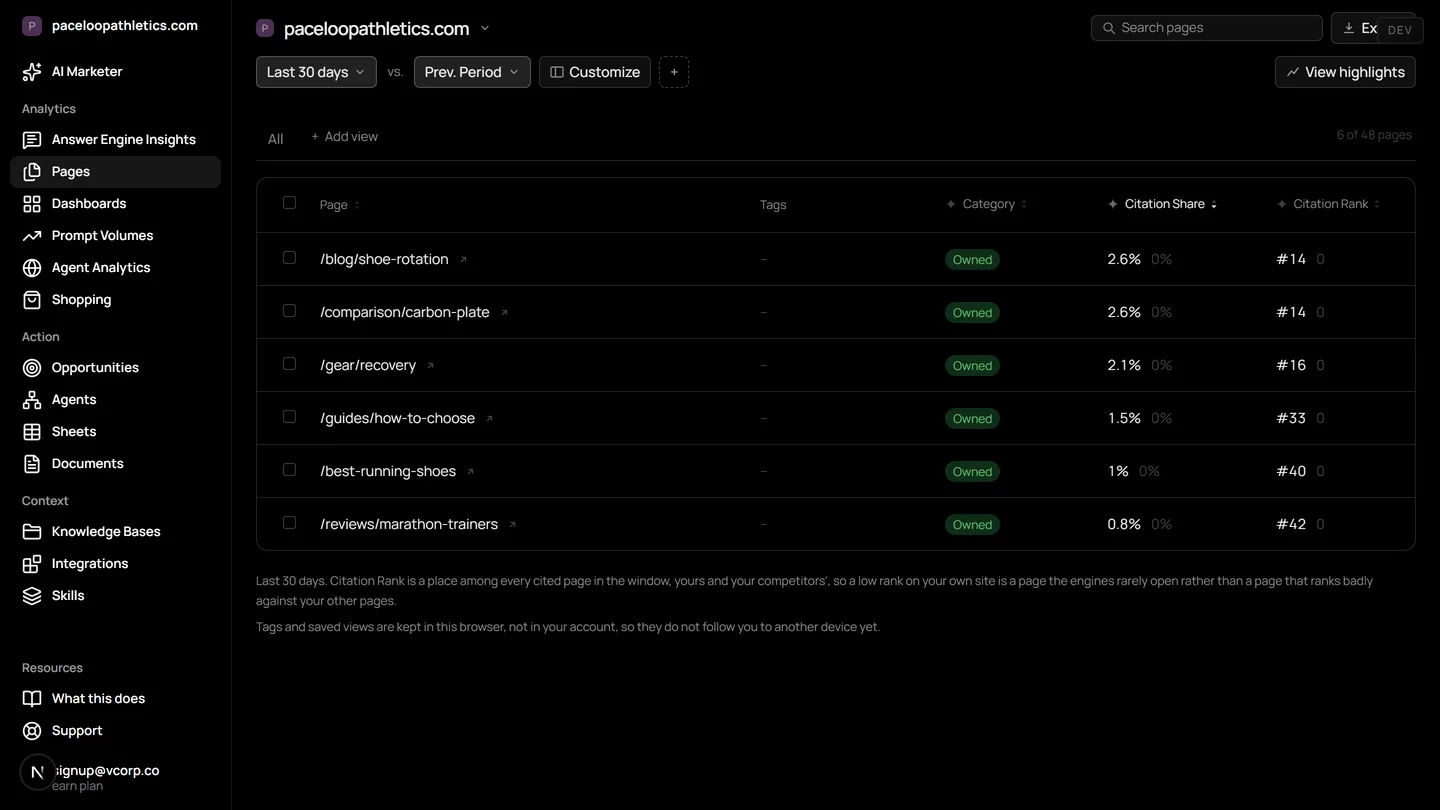
Mentionry shows you which pages does ChatGPT cite from my site, along with Gemini and Google AI Overviews. It records the full answer text and every cited URL each day, so you can see which of your pages are being referenced and which are being ignored by AI.
Understand and control your AI presence
Content performance tracking
See which pages are frequently referenced in AI-generated responses, on which prompts, by which engine, and the trend.
Never cited
The pages with no citations at all, which is the list to optimize or retire.
The page as the crawler sees it
The detail view fetches the page the way a bot would and reports what it could read, with the robots rules that apply to AI crawlers.
Where it lives in the platform
In the product it is /dashboard/pages. On the trial it reads your own site from the first day; on Starter it keeps going, and on Enterprise it runs for every brand you have under one login.
What it means to track which pages AI cites
When a buyer asks an AI assistant a question, the engine reads web pages to build its answer. It then cites the specific pages it used. This is AI citation.
Knowing which of your pages are cited tells you what content AI engines find useful. It shows which topics and formats they prefer. Pages that are never cited are invisible to this new channel, much like a page not indexed by Google is invisible to search.
This matters because the answer is the destination. In traditional search, a user clicks a link from a results page. In AI search, the answer itself is the product, with citations as footnotes. Your goal shifts from earning a click to earning a citation within the answer.
Why page level AI visibility is different
AI visibility is not about ranking for a keyword. It is about whether your page is one of the few sources an engine chooses to cite for a specific question. A single page can be cited for hundreds of different user prompts.
The engines do not treat all content equally. They have preferences for depth, structure, and authority that differ from traditional search crawlers. A page that ranks well in Google may never appear in a ChatGPT answer.
Tracking citations by page gives you the unit of analysis for improvement. You can see which page is working, on which engine, for which type of question. You can then create more content like it, or update pages that are not being seen.
How Mentionry tracks pages cited in AI overviews
You add the questions your buyers ask. Mentionry puts each question to the answer engines on your plan, like ChatGPT and Google AI Overviews, once a day. It takes three samples per reading to account for variability.
For every answer, it records the complete text and every URL the engine cites. It knows which URLs belong to your owned domains. These records are kept and aggregated on the Pages screen.
The main dashboard shows a list of all pages from your domains that have ever been cited. For each page, you see the total citation count, the specific prompts that led to citations, and which engines cited it. A trend graph shows citation activity over time.
Seeing content cited by LLMs and content ignored
The Pages screen has two primary views. The first is your cited content. You can filter this list by engine, by topic, or by date range to see performance. Clicking on a page opens a detail view.
The detail view shows every instance where that page was cited. You see the exact answer snippet it appeared in, the full user prompt, the date, and the engine. This tells you the context in which your page was used.
The second view is 'Never Cited'. This is a list of pages from your site that have no citations across all your tracked prompts and engines. This is your starting point for content optimization or retirement.
How to use the Pages report each week
Open the Pages screen and sort by citation count descending. Look at your top three cited pages. Note the prompts they answer. Your task is to create more content that addresses related questions in a similar style.
Filter to 'Never Cited' and export the list. For a key product page on that list, open the detail view. Mentionry fetches the page as a bot would and shows you the rendered text. Check for clarity, structure, and whether key information is easily accessible. Update the page accordingly.
Use the trend graphs. A page with rising citations is gaining AI visibility. A page with a sudden drop may have been superseded by a competitor's content or affected by an engine update. Investigate by checking the prompts for that period.
How to read the numbers and what they do not mean
A citation count is a measure of visibility, not traffic or quality. Ten citations mean your page was referenced ten times in the answers to your tracked prompts. It does not mean ten people saw it, as each answer can be served to many users.
The trend is more important than the absolute number. A steady increase suggests your content is becoming more relevant to the engines for those questions. A flat line may mean you have saturated the topic or need to track new prompts.
Average position is not a ranking. In an AI answer, sources are often listed but not explicitly ranked 'first' or 'second'. The average position metric in Mentionry is based on the order URLs appear in the answer's citation list. A lower number means your citation tends to appear earlier in that list.
Do not assume a citation is an endorsement. The engine may cite your page as a source for a negative sentiment or a factual counterpoint. Always read the answer text in the detail view.
What the Pages report does not do yet
The Pages report shows citations from the prompts you track. It cannot show you citations from questions other people are asking that you have not added to your account.
It does not predict which pages will be cited in the future. It reports on what has already happened.
It does not analyze the on page elements that led to the citation, such as specific sentences or data points. It shows you the page that was cited as a whole.
The 'Never Cited' view includes all pages it can discover from your site map or crawl. If a page is blocked by robots.txt or a noindex tag, it may not appear in this list.
Plans and access
The Pages feature is live on every plan. The free trial includes it for seven days, with 50 prompts a day put to ChatGPT, Gemini, and Google AI Overviews.
The Starter plan, at $99 a month, includes daily readings on those three engines for one brand. You get the full Pages report with exports.
Enterprise plans include more engines, such as Perplexity and Claude, and track multiple brands. The number of prompts, regions, and languages is set on the quote.
Questions
Yes. It reads your sitemap, so the never-cited list is the whole site minus the cited pages.
Get your brand mentioned by the answer engines
Reach millions of consumers who are using AI to discover new products and brands. The first 7 days are free and take no card; Starter is $99 a month after that, and Enterprise is tailored.