Agents
Agent templates
Get started faster with templates from the Mentionry library. 11 ready-to-use Agents built around the most common workflows, so your team does not have to start from scratch. Every run keeps what every step did.
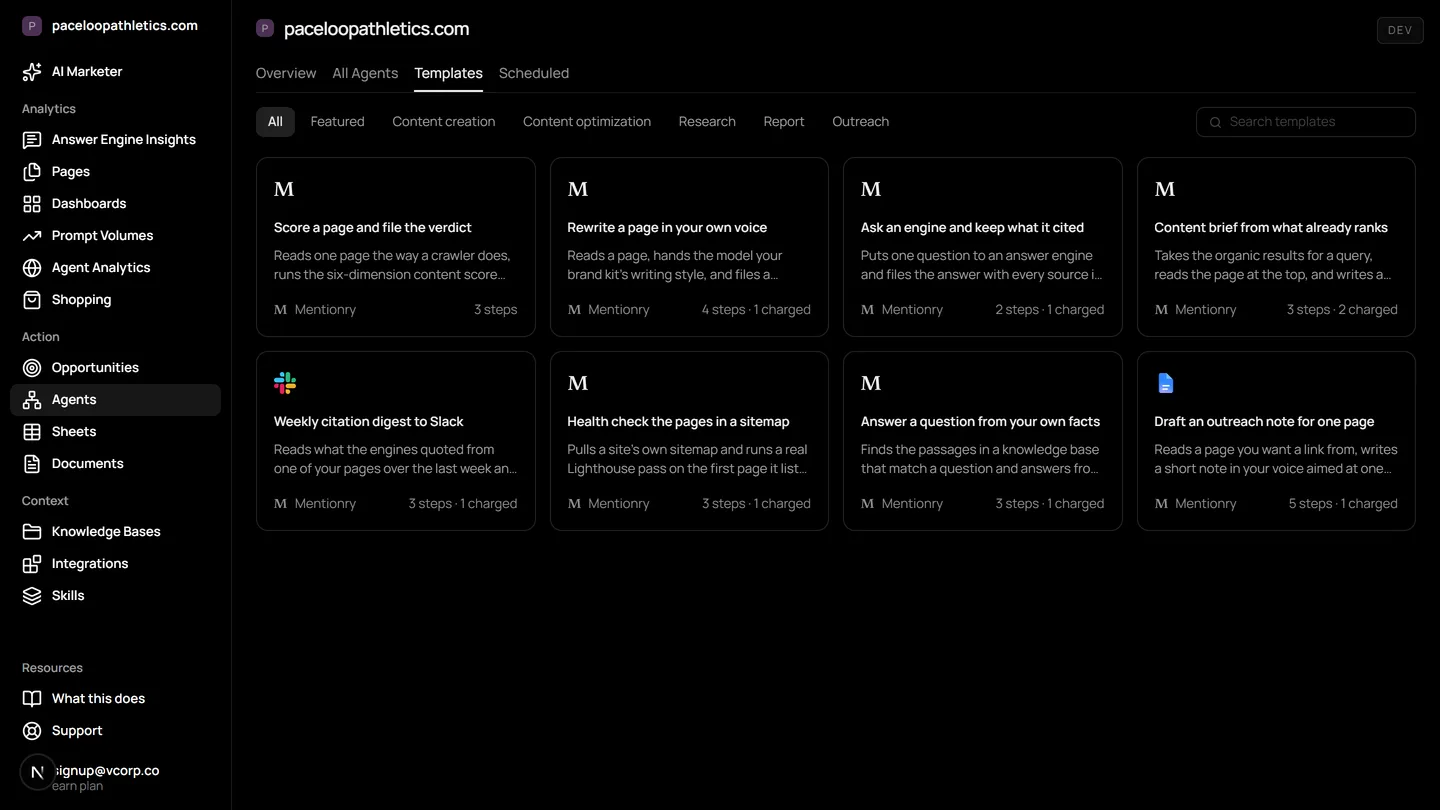
Marketing agent templates are ready-made workflows inside Mentionry's AI marketing platform. They use your tracked prompts, brand kit, and connected apps to automate tasks like scoring content, drafting outreach, or filing research from answer engines like ChatGPT and Google AI Overviews. You can run a template as is, edit its steps, or use it as a starting point for your own agent.
Content optimization
Score a page and file the verdict
Reads one page the way a crawler does, runs the six-dimension content score over it, and keeps the verdict as a document.
Inputs: Page URL · 3 steps
- 1Read the page
- 2Score it
- 3File the verdict
Content creation
Rewrite a page in your own voice
Reads a page, hands the model your brand kit's writing style, and files a rewrite that sounds like you rather than like a model.
Inputs: Page URL · 4 steps
- 1Read the page
- 2Your writing style
- 3Rewrite it
- 4File the rewrite
Content brief from what already ranks
Takes the organic results for a query, reads the page at the top, and writes a brief grounded in what is already winning.
Inputs: Topic · 3 steps
- 1What ranks
- 2Write the brief
- 3File the brief
Answer a question from your own facts
Finds the passages in a knowledge base that match a question and answers from those alone, so nothing is invented.
Inputs: Question · 3 steps
- 1Your facts
- 2Answer from them
- 3File the answer
Research
Ask an engine and keep what it cited
Puts one question to an answer engine and files the answer with every source it named, so a claim can be checked later.
Inputs: Topic · 2 steps
- 1Ask the engine
- 2File the answer
Find the Reddit threads the engines are reading
Finds live threads on your topic, reads what is actually being asked, and files a note on which ones you could honestly answer in.
Inputs: Your brand name, What your buyers ask about · 4 steps
- 1Find the threads
- 2Your voice
- 3Which ones you could honestly answer
- 4File the shortlist
Find the LinkedIn conversations about your category
Finds posts your buyers are discussing, and files what you could add to each as a comment from your own account.
Inputs: Your brand name, What your buyers ask about · 4 steps
- 1Find the posts
- 2Who you are talking to
- 3What you could add
- 4File the shortlist
Report
Weekly citation digest to Slack
Reads what the engines quoted from one of your pages over the last week and posts a short summary into a channel.
Inputs: Page URL · 3 steps
- 1What was quoted
- 2Summarise it
- 3Post it
Health check the pages in a sitemap
Pulls a site's own sitemap and runs a real Lighthouse pass on the first page it lists, then files what it found.
Inputs: Domain · 3 steps
- 1The sitemap
- 2Lighthouse
- 3File the result
Outreach
Draft an outreach note for one page
Reads a page you want a link from, writes a short note in your voice aimed at one audience, and files it as a Google Doc.
Inputs: Page URL · 5 steps
- 1Read their page
- 2Who it is for
- 3Your voice
- 4Draft the note
- 5File it in Drive
Invite a customer to review you where the engines read
Writes a short, honest review invitation in your voice for one of your own customers. You send it, and nobody writes a review but them.
Inputs: Your brand name, The customer to invite · 4 steps
- 1Who you are writing to
- 2Your voice
- 3Draft the invitation
- 4File it to send
What marketing agent templates do
An agent template is a reusable workflow. It chains steps together: reading a page, asking an engine a question, drafting a note in your voice, or posting a summary to Slack. Each template is built for a specific marketing job, like creating a content brief or checking which pages the AI engines are reading.
When you run a template, it works with your account's own data. It reads from your tracked prompts in Mentionry, uses your brand kit for tone, and can write into your connected apps like Google Drive or HubSpot after you approve the action. Every run keeps a record of what each step did and what it produced, so you can see how a result was built.
Kinds of templates you will find
The library is sorted by the job the template does. You do not need to browse every one. Start with the kind of task you repeat most often.
For content and SEO, there are templates like 'Score a page and file the verdict' and 'Content brief from what already ranks'. These use your site's own pages and the search results for your tracked topics to give grounded advice. An SEO agent template might analyse a page against six dimensions or draft a brief based on what is already ranking organically.
For research and monitoring, templates like 'Ask an engine and keep what it cited' and 'Weekly citation digest to Slack' work with your answer engine readings. They put a question to ChatGPT, Gemini, or another engine on your plan and file the full answer with every source cited. This creates a checkable record of what the AI said about your topics.
For outreach and engagement, templates handle drafting and filing. 'Draft an outreach note for one page' reads a page you want a link from and writes a short note in your voice. 'Find the LinkedIn conversations about your category' identifies posts where you could add a genuine comment. These drafts are filed as documents for your review before any sending happens.
How to use an AI agent template
Open a template to see its steps laid out in plain English. A template like 'Rewrite a page in your own voice' might show: Read the page, apply your writing style, rewrite it, file the rewrite. You can run it immediately on a specific URL, or you can edit any step first.
Always use the test run. This executes the template once with your inputs so you can see exactly what it will do and what it will produce, without saving anything to your apps or scheduling it. Once you are satisfied, you can schedule the agent to run recurrently, for example every Monday, or run it manually whenever you need it.
The output depends on your data. A research template will only cite sources from the engines on your plan. An outreach draft will use the voice from your brand kit. If a step requires a connection, like posting to Slack, you will see an approval card before anything is written.
Where the templates get their information
Templates are not generic prompts. They are wired into your Mentionry account. A content brief agent template uses the organic results for your own tracked queries. A citation digest template reads from your own recorded answer engine insights.
For brand voice and facts, templates pull from your Knowledge Bases (the Context Manager). This holds your product lines, audience definitions, and approved messaging. When a template drafts an outreach note or answers a question, it uses only this ground truth, which prevents invention.
For actions, templates can use your connected apps. The library supports over 1,500 apps including HubSpot, Notion, Google Sheets, and WordPress. A template might file a draft as a Google Doc, post a summary to a Slack channel, or add a row to a spreadsheet, but only after you approve the specific write action.
Limits of the template library
Templates only work with the data and connections you have. If you do not track a prompt in Mentionry, a research template cannot file answers about that topic. If you have not connected your Google Drive, a template cannot file a document there.
They are starting points, not finished solutions. You are expected to review a draft, edit a brief, or select which Reddit threads from a shortlist are right for your brand. The AI Marketer does the first draft or the gathering, you do the final judgment.
Templates cannot place links or promise publication. An outreach draft agent creates a note for you to send from your own mailbox. Whether a publisher then cites you is their decision. The template's job ends when the draft is filed.
Video creation is limited to clips of up to eight seconds. Templates do not perform video edits or voice overs. Proactive alerts are not built in, you must schedule an agent, like a weekly digest, to receive reports.
Choosing your first marketing agent templates
Start with a task you do weekly. If you check which pages Google AI Overviews cited from your site each Friday, the 'Weekly citation digest to Slack' template automates that. If you audit new blog posts, the 'Score a page and file the verdict' template runs the content score for you.
Look for a template that closes a data gap. If you know what ranks but struggle to turn that into a brief, use the 'Content brief from what already ranks' template. If you want to systematically record what AI says about your competitors, use the 'Ask an engine and keep what it cited' template.
Your plan determines how many runs you have. The free trial includes agent runs. The Starter plan includes 100 agent runs a month. You can run any template within that allowance. There is no separate cost for using templates.
Questions
A marketing agent template is a pre-built workflow inside Mentionry. It combines steps like reading data, asking an AI engine a question, drafting text in your brand's voice, and filing the result to an app like Google Docs or Slack. It uses your account's specific data, such as your tracked prompts and brand kit, to perform a repeatable marketing task automatically, with your approval required for any external writes.
Build marketing for the AI era with Agents
Every channel covered. Every opportunity captured. Templates run inside the product against your own readings, brand kit and pages; the trial includes agent runs and Starter includes a hundred a month.