Operate
Agents
Deploy custom Agents that extend your brand's reach: research, writing, outreach and reporting, with human-in-the-loop approvals before anything goes live.
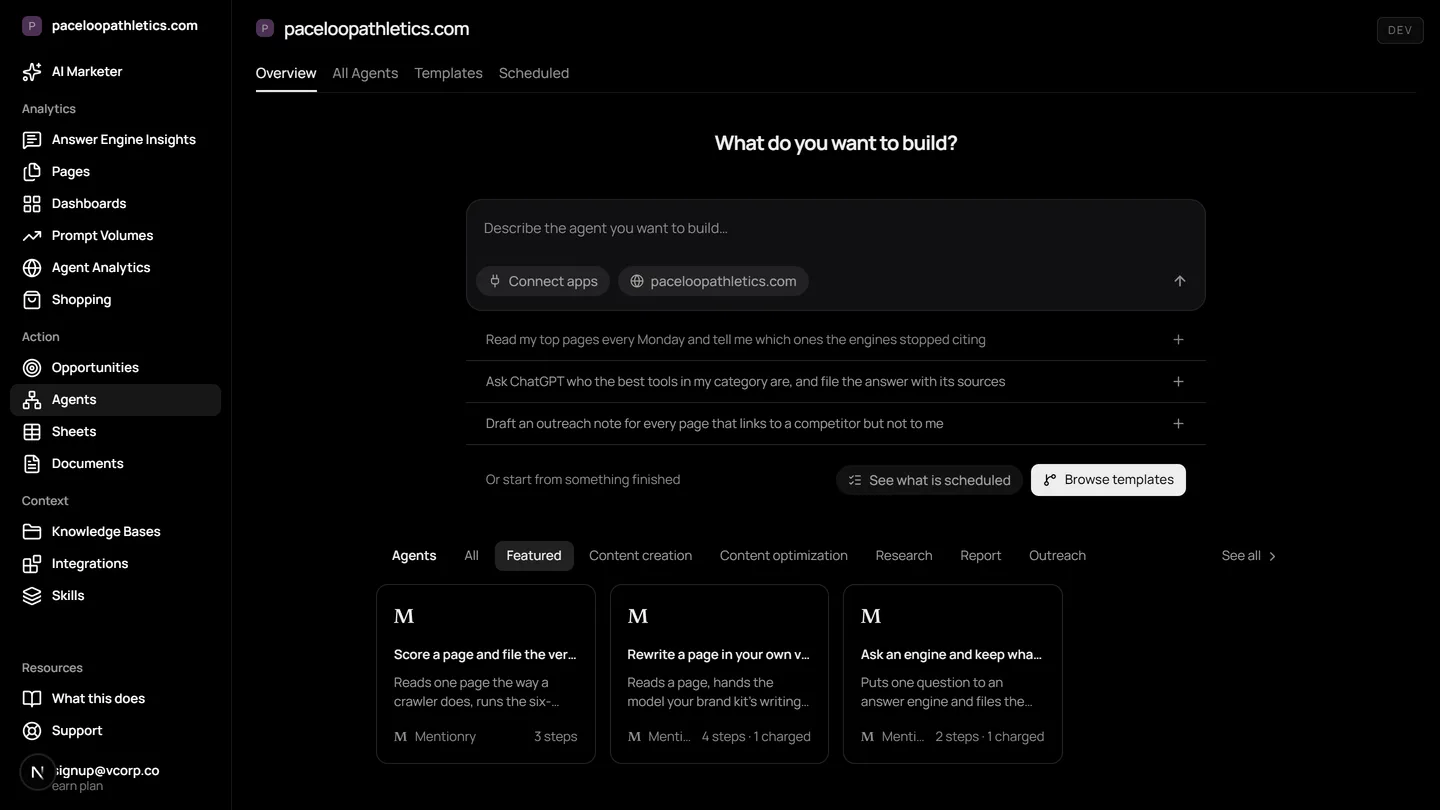
AI marketing agents are automated workflows that handle repetitive marketing tasks, like checking competitor visibility in answer engines or drafting outreach emails. In Mentionry, you build these agents from templates, connect them to your brand's data and 1,500+ apps, and run them with a mandatory approval step before any action is taken. This multiplies your team's capacity for AI search visibility work without losing control.
Understand and control your AI presence
Start fast with templates
Choose from ready-to-use Agents built around the most common workflows: content refresh, briefs, research, reporting, outreach.
Steps you can see
Web scraping, answer engine lookups, model prompts, brand kit and knowledge base reads, scoring, Slack posts. Every step's output is kept.
Human-in-the-loop approvals
Every run includes an approval step before anything is sent or filed, so you stay in control of what goes out.
Deploy at scale with Sheets
Process hundreds of inputs in parallel. Each column can be an Agent, with outputs flowing across the sheet.
What is not there yet
- The drag-and-drop canvas for building a new chain from scratch is not there yet. Today you start from a template and edit its inputs; the engine underneath already runs arbitrary chains.
- Eleven templates, against the thirty-odd the category leader lists. The missing ones are mostly recombinations of the same steps and are being added.
- No direct publish to a CMS. Documents and Google Docs are the destinations today.
Where it lives in the platform
In the product it is /dashboard/agents. On the trial it reads your own site from the first day; on Starter it keeps going, and on Enterprise it runs for every brand you have under one login.
What AI marketing agents are for
An AI marketing agent is a set of instructions that runs automatically. It might check what ChatGPT says about your brand every Monday, draft a brief for a new landing page, or find journalists who are writing about your competitors. The category exists because buyers now ask AI engines like Google AI Overviews and Perplexity what to buy. Your marketing needs to work at the speed and scale of those conversations.
Traditional automation tools often work in a vacuum. An AI marketing agent for answer engine visibility must read from the engines themselves, use your brand's specific language, and act through the channels you already use. It is not a generic chatbot. It is a specialised worker that operates on your behalf, using your data.
Why agents matter for AI search and AEO
When a buyer gets one paragraph from an answer engine instead of ten blue links, your marketing mechanics change. You cannot manually check every possible question, in every engine, every day. You need to monitor not just if you are mentioned, but how you are described, which pages were cited, and what your competitors said.
An AEO agent automates that monitoring and the response. It can watch for sentiment shifts, identify new citation opportunities from the query fan out, and prepare a draft reply or content update for your team to approve. This turns visibility from a reporting exercise into an operational loop. The agent does the repetitive looking and drafting, you make the strategic decision.
How Agents work in Mentionry
In Mentionry, you build and run Agents from the Agents dashboard. Each Agent is a sequence of steps. A step can be reading from your tracked prompts in ChatGPT or Gemini, checking your Context Manager for brand guidelines, scraping a webpage, running a model prompt, or posting a draft to Slack. Every step's input and output is logged in the run history.
The core mechanic is the approval card. For any step that writes outside Mentionry, like sending an email via your connected Gmail or updating a HubSpot record, the Agent pauses. It presents the exact text or change to you for approval. Nothing is sent or filed until you confirm it. This human in the loop is mandatory.
You start from an Agent template. These are pre built workflows for common jobs: refreshing old content based on new answer engine citations, building a competitive briefing, or running a weekly visibility report. You edit the template's inputs, like which competitor to track or which Slack channel to notify, and save it as your own Agent.
Automated AI search workflows you can run this week
Here are concrete ways to use Agents. Open the Agents dashboard, pick a template, and adjust it for your brand.
First, a daily competitor check. Set an Agent to read your tracked prompts in Google AI Overviews and Claude. Ask it to list any mentions of your three main competitors and the context they are mentioned in. Have it format the findings into a brief summary and post that to a dedicated Slack channel every morning. You will see the competitive landscape in AI search without opening a tool.
Second, a content refresh pipeline. Create an Agent that looks at your Pages report to find owned pages that answer engines open but rarely cite. The Agent can draft an update brief for each page, suggesting new sections based on the questions buyers are actually asking, which you see in Prompt Volumes. It saves each brief as a Google Doc in your team drive for your content team to review.
Third, an outreach triage agent. Connect the Opportunities screen to an Agent. Configure it to score each new journalist request or podcast pitch against your brand kit. The high scoring opportunities move to a list in your project management tool, like Notion, with the initial pitch already drafted in the Desk. Your team reviews the list and approves the drafts to send.
How to read the results and what they mean
Each Agent run has a history. You can see what data it retrieved, what logic it applied, and what it produced. Look for patterns in the outputs over time, not just single data points. An agent that drafts ten briefing docs a week is saving your team time.
A change in an Agent's output usually reflects a change in the underlying data. If your weekly visibility digest suddenly shows a drop in mentions, check the Monitor readings for that day. The agent is reporting the trend, not causing it. Nothing here is promised about rankings or traffic. The value is in consistent, automated observation and draft creation, giving your team more time for strategy.
The traps to avoid are over automation and stale inputs. Do not let an Agent send outreach without a human reading the draft first, which Mentionry enforces. Regularly review the knowledge bases and prompts your Agents use. If your product messaging changes, update your Context Manager so the Agents write from the latest truth.
What Agents cannot do yet
Agents are live, but some parts are still being built. You should know the limits before you start.
There is no drag and drop canvas for building a new Agent chain entirely from scratch. Today, you start from a template and edit its configuration. The underlying engine can run complex chains, but the visual builder is not there yet.
We offer eleven templates. Some other platforms list thirty. The missing templates are often recombinations of the same core steps we already have, and they are being added. You cannot directly publish an Agent's output to a CMS like WordPress yet. The destinations for now are Mentionry Documents and connected Google Docs.
Plans, prices and what is included
You can try Agents free for seven days on your own site. The trial gives you 50 prompts a day put to ChatGPT, Gemini and Google AI Overviews. You can build and run agents within those limits.
The Starter plan is 99 dollars a month. It includes 50 tracked prompts, readings on those three engines, one brand, and 100 Agent runs per month. You also get an MCP server for connections and data exports.
For larger teams, the Enterprise plan is quoted individually. It covers every brand under one login, up to nine answer engines, 400 prompts, multiple regions and languages, from ten seats, with API access and SSO. A named contact manages your setup.
Questions
Research, briefs, rewrites, reports and outreach drafts, from templates or copied and edited, on a schedule, with every run recorded.
Get your brand mentioned by the answer engines
Reach millions of consumers who are using AI to discover new products and brands. The first 7 days are free and take no card; Starter is $99 a month after that, and Enterprise is tailored.