Operate
Agent templates
Choose from ready-to-use Agents built around the most common workflows, so your team does not have to start from scratch.
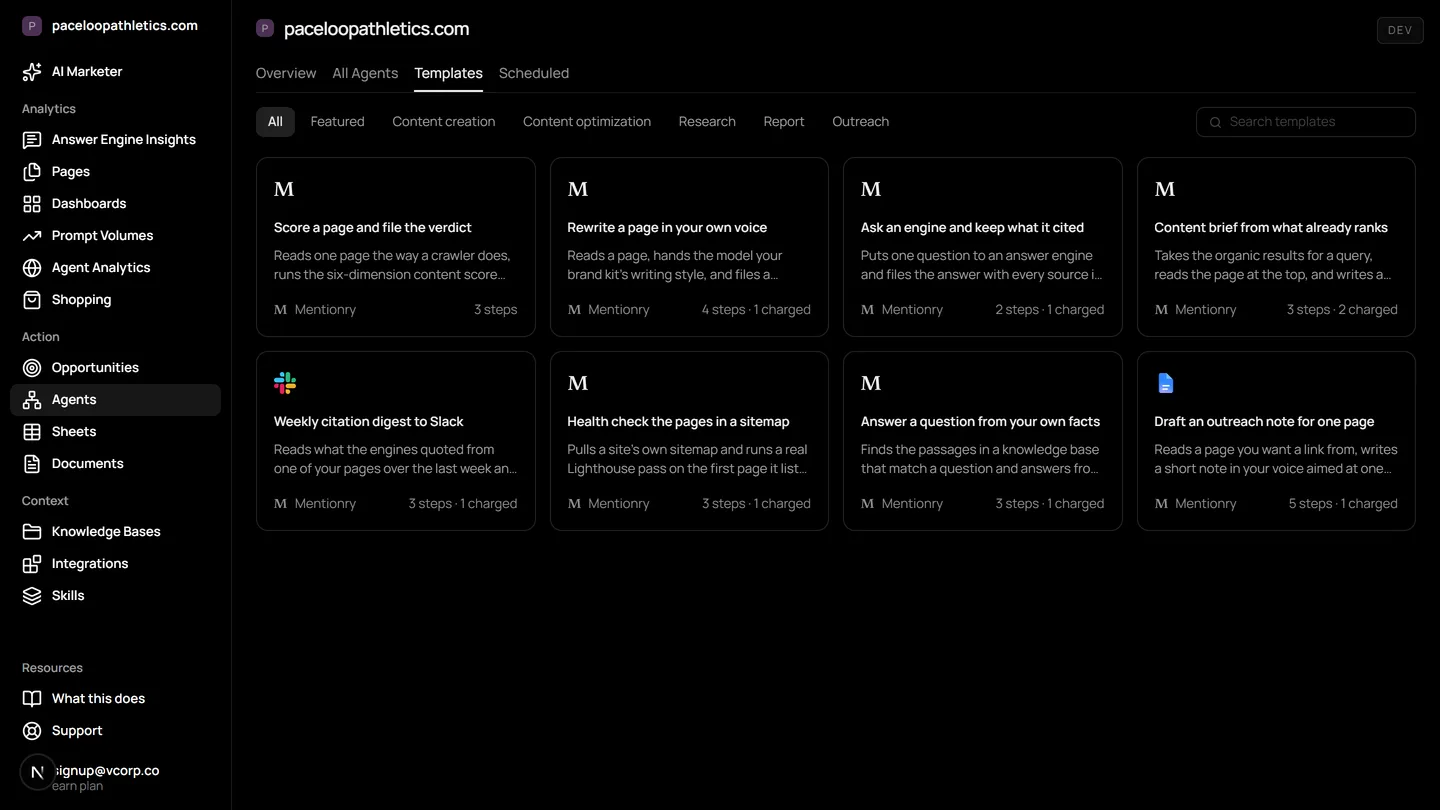
AI agent templates for marketing are pre-built workflows that automate tasks like monitoring answer engines, drafting content from citations, and running outreach campaigns. Mentionry provides a library of these templates on its AI marketing platform, so you can start measuring AI visibility and acting on insights without writing instructions from scratch.
Understand and control your AI presence
Content creation
Content briefs from what already ranks and is cited, rewrites in your own voice, grounded answers from your own facts.
Research and reporting
Ask an engine and keep what it cited, mine the threads your buyers are reading, post a weekly citations digest to Slack.
Outreach and distribution
Draft an outreach note for one page, in your voice, to the audience you defined. Invite customers to review you where the engines read.
Where it lives in the platform
In the product it is /dashboard/agents/templates. On the trial it reads your own site from the first day; on Starter it keeps going, and on Enterprise it runs for every brand you have under one login.
What AI agent templates are for marketing
AI agent templates are reusable, step by step instructions for an AI assistant. In marketing, they automate the repetitive work of watching what AI answer engines say about your brand and acting on what you find. Instead of manually asking ChatGPT the same questions every day or crafting each outreach email individually, you set up an agent once from a template. It then runs on a schedule you choose, doing the work with your approval before anything is sent or changed.
This matters because your buyers are now asking AI assistants like Google AI Overviews, Gemini, and Perplexity what to buy. The old model of ten blue links is giving way to single paragraph answers with citations. You need to know which answers name your brand, which pages they cite as sources, and where you are missing. Manually checking this across multiple engines and queries is impractical. Agent templates turn that monitoring into a scheduled, recorded process.
How AI agent templates work with answer engines
Mentionry's agent templates are built specifically for the data that comes from AI search. When you use a template, it connects to the answer engines on your plan, such as ChatGPT, Google AI Overviews, and Claude. It reads the full answer text, records every URL the model cited, and notes every brand mentioned. This data is stored in your account's readings.
The templates then use this stored data to act. A research template might compile a weekly digest of new citations and post it to your Slack. A content template might analyse the pages that answer engines are citing for a topic, then draft a brief for a new article that fits what already ranks. An outreach template could identify a journalist's request for expert commentary that matches your expertise and draft a pitch in your brand's voice. The agent does the legwork of finding the data and drafting the next step, but it always presents an approval card for you to confirm before anything is sent or published.
The templates you can use right now
On the Agent templates screen in Mentionry, you will find templates organised into three groups: content creation, research and reporting, and outreach and distribution. You do not have to build these from a blank page.
For content creation, there is a content brief agent. It looks at the pages that currently rank and are cited by answer engines for your tracked topics. It uses that analysis to draft a detailed brief for a new piece, ensuring your content is grounded in what the AI is already reading. Another template can rewrite existing text into your brand's voice, or generate answers that are strictly based on the facts in your knowledge bases.
For research, a page scoring agent template is available. It can analyse a specific URL against a set of criteria you define, useful for auditing your own site or a competitor's. Other templates mine the discussion threads and forums your buyers read, or post a weekly summary of new citations to a Slack channel you choose.
For outreach, an outreach draft agent template helps with distribution. It can take a single page, like a new blog post, and draft a personalised outreach note to a relevant audience, using the voice and details from your brand kit. Another template can identify places where your customers might leave reviews that answer engines are likely to read, and draft an invitation for them to do so.
How to use agent templates in a week
Using a template is a matter of selecting it, configuring a few settings, and setting a schedule. Here are two concrete workflows a marketer might run.
First, for daily visibility tracking. Open the Agent templates screen and find the 'Monday visibility digest' template. Configure it to run every Monday morning. It will automatically check your tracked prompts in ChatGPT, Gemini, and Google AI Overviews from the past week, compile a report on your visibility score and share of voice against competitors, and draft an email to your team. You review and approve the draft before it is sent from your connected mailbox.
Second, for proactive content opportunities. Each morning, open the Opportunities screen to see journalist requests. When you find one that aligns with your expertise, use the 'outreach draft agent' template. The agent will pull details from the request and your brand kit to draft a pitch. You then go to the Desk, review the draft, and approve it to be sent from your own email. The goal is to earn a citation, but whether the journalist includes one is their decision.
How to read the numbers from an agent
When an agent runs, it produces results you can review in its run history. It is important to understand what these numbers mean and what they do not. A visibility score shows how often your brand was named in the answers to your specific tracked prompts that day. An increase means you appeared more often for those questions. It does not mean you are visible for all questions buyers might ask.
A share of voice metric compares your mentions against named competitors in the same answers. A shift here shows whose narrative is dominating the AI's response for your tracked topics. The citations report shows which of your pages the engines opened and cited. If a key page is never cited, it is effectively invisible to AI search, regardless of its organic traffic. These numbers are measurements, not promises. They reflect the AI's behaviour for your queries, not a promise of future traffic or rankings.
What agent templates do not do
Agent templates automate workflows based on the data Mentionry can read. There are inherent limits to this. The agents only act on the prompts you are tracking. Mentionry cannot see what other people type into ChatGPT or other engines. There is no backfill of historical data, recording starts the day you add a prompt.
The templates themselves have no specific limits listed. However, the actions they can perform are bounded by the wider platform. For instance, video creation is limited to clips of up to eight seconds, without editing or voice over. Proactive alerts, like a sudden sentiment drop pinging you without warning, are not built. You must set up a scheduled agent to check for such changes. The agents can draft and propose actions, but they never place, publish, or pay for a link. Any outreach is sent only after your explicit approval.
Plans and access to agent templates
Agent templates are live on every Mentionry plan, including the free seven day trial. On the trial, you can use templates with up to 50 prompts a day put to ChatGPT, Gemini, and Google AI Overviews. The trial ends automatically after seven days.
The Starter plan, at $99 a month, includes 50 prompts, daily reads on those three engines, one brand, and 100 agent runs a month. All available templates are included. For larger teams, the Enterprise plan is quoted individually. It covers every brand under one login, access to more engines like Perplexity and Claude, higher prompt limits, multiple regions and languages, and more seats. API access and single sign on are also part of Enterprise.
Questions
Copy any template, change its inputs and its schedule. A drag-and-drop builder for new chains is coming.
Get your brand mentioned by the answer engines
Reach millions of consumers who are using AI to discover new products and brands. The first 7 days are free and take no card; Starter is $99 a month after that, and Enterprise is tailored.